
Create a desk calendar with dated pages, encouraging quotes, and a stable stand using this beginner-friendly guide. You will plan the calendar’s format, select or write suitable quotes, lay out the pages, print them, and assemble the finished set. The work takes about 3-5 hours, with extra time for printing or drying if you use a print shop or wet adhesive. You can make a calendar for yourself or prepare one as a gift.

Get the little things that make your day delivered free with Prime
- Fast, free delivery on millions of items
- Prime Video, Amazon Music and more included
- Member-only deals all year

RYVE Perpetual Motivational Desk Calendar with Daily Quotes and Affirmations
- ✔ Format: Desk calendar
- ✔ Content: 366 daily quotes, affirmations, and self-reflection prompts
- ✔ Calendar type: Perpetual; month and date shown, no year or weekday

2027 Great Quotes from Great Leaders Boxed Calendar
- ✔ Year: 2027
- ✔ Format: Boxed daily calendar
- ✔ Content: 365 inspirational quotes
ZICOTO 2027 Daily Affirmation Desk Calendar
- ✔ Brand: ZICOTO
- ✔ Year: 2027
- ✔ Content: 365 daily affirmations and inspirational quotes
Difficulty: Beginner | Time: 3-5 hours, plus printing and drying time
What You’ll Need
Tools & Materials:
- Computer with a word processor, presentation app, or page-layout program
- Printer or access to a print shop
- Paper cutter or ruler and scissors
- Hole punch or binding rings, depending on the chosen stand
- Card stock or heavy paper for pages and stand
- Pen or keyboard for drafting quotes
Knowledge:
- Basic typing and document editing
- Ability to check dates against a calendar
- Basic cutting, folding, or hole punching
Decide whether you want a 12-page monthly calendar or a 365-page daily calendar before you start. A monthly version is quicker to make and gives each quote more room. A daily version needs more quotes, paper, and binding capacity. For a first project, use a monthly format or a smaller set of daily pages. If you plan to sell or distribute the calendar, check the rights for every quote and image; a quote’s appearance on the internet does not make it free to reuse.
RYVE Perpetual Motivational Desk Calendar with Daily Quotes and Affirmations
RYVE is our strongest all-around choice because it gives a daily message more than one job. Along with 366 quotes and affirmations, it includes self-reflection prompts, which can turn a quick glance into a short pause to consider how a message applies. Compared with Great Quotes from Great Leaders, which is described as quotes alone, RYVE offers a more varied routine. It also provides more flexibility than the dated ZICOTO calendar because its pages are undated and can be used again in a later year.That flexibility comes with a practical compromise: RYVE shows the month and date but does not show the weekday, so it is less useful as a conventional calendar. Its 5 x 4 inch paper pages are easy to fit on a desk, but the compact size may make text harder to read from a distance. The wire binding and fold-out easel are designed for upright display, and the illustrated keepsake box makes it a considered gift option. We would choose it for a motivational desk ritual, rather than for tracking appointments or quickly checking the day of the week.
Pros:
- Perpetual undated pages can be reused year after year.
- Combines quotes, affirmations, and self-reflection prompts.
- Fold-out easel supports upright display on a desk.
- Illustrated keepsake box is suited to gifting.
Cons:
- The 5 x 4 inch format may be small for some readers.
- Pages show no day of the week.
Best for: Readers who want reusable daily encouragement that combines quotes, affirmations, and a prompt for reflection.
Not ideal for: Anyone who needs weekday tracking or prefers larger pages for reading from across a desk.
Bottom line: Choose RYVE for the broadest and most reusable motivational routine, provided its compact pages and lack of weekdays suit your needs.
“Choose RYVE for the broadest and most reusable motivational routine, provided its compact pages and lack of weekdays suit your needs.”
2027 Great Quotes from Great Leaders Boxed Calendar
This calendar is the most straightforward pick in the group: 365 inspirational quotes from leaders, arranged as a daily boxed desk calendar for 2027. That focused premise makes it a natural fit for readers who want to encounter a quotation without prompts or affirmation exercises. Compared with RYVE, it has a narrower motivational format and no perpetual reuse described; compared with ZICOTO, its stated distinction is the leadership theme rather than a mix of affirmations and quotes.The tradeoff is that the available details say little about the calendar beyond its quote content and desk display. We do not have a listed size, binding style, or material to help judge how it will fit a particular workspace. Its boxed format is described as compact, which favors a desk with limited room, but the content is limited to inspirational quotes. Choose it when the source and simplicity of a daily quotation are the point. If we want prompts for reflection, affirmations, or a calendar that carries over to another year, RYVE is the more versatile choice.
Pros:
- Includes 365 inspirational quotes for daily use in 2027.
- Leader-focused theme gives the quote collection a clear editorial angle.
- Boxed format is described as compact for desk display.
Cons:
- Content is limited to inspirational quotes.
- The calendar is year-specific rather than described as reusable.
- Listing details do not specify dimensions, binding, or material.
Best for: Readers who want a 2027 desk calendar centered on one inspirational quote per day from notable leaders.
Not ideal for: Buyers seeking reflection prompts, affirmations, a perpetual format, or detailed physical specifications before choosing.
Bottom line: Pick Great Quotes from Great Leaders for a focused daily quotation, while recognizing it offers fewer kinds of motivational content than RYVE or ZICOTO.
“Pick Great Quotes from Great Leaders for a focused daily quotation, while recognizing it offers fewer kinds of motivational content than RYVE or ZICOTO.”
ZICOTO 2027 Daily Affirmation Desk Calendar
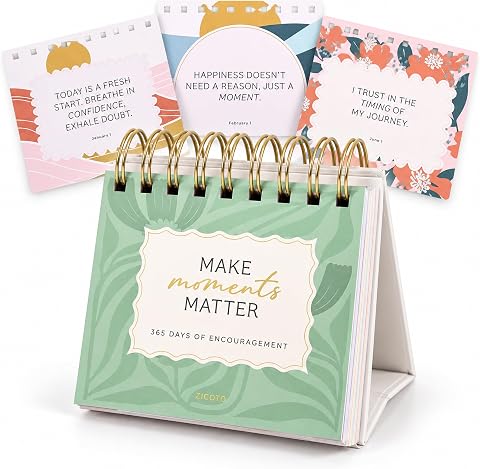
ZICOTO is the compact, year-specific alternative for readers who want affirmations as well as inspirational quotes. Its 365 daily messages and standing flip format make it easy to place on a desk or nightstand, while ring wire binding lets the calendar stand on its own. Compared with the Great Quotes calendar, ZICOTO names both affirmations and quotes as part of its daily content. It is less expansive than RYVE, however, because no self-reflection prompts or reusable pages are specified.The 5.12 x 5.2 inch dimensions give buyers a concrete sense of its small footprint, and the art paper cover adds a decorative touch. That can suit a personal workspace where a calendar is also part of the decor. The defining constraint is its 2027-only design: unlike RYVE, it is not presented as a perpetual calendar. Its daily content is also limited to affirmations and quotes, so readers looking for questions or prompts to guide reflection may prefer RYVE. ZICOTO earns its place for a neat standing format and a blend of short motivational messages, not for added calendar tools.
Pros:
- Provides 365 daily affirmations and inspirational quotes.
- Compact dimensions suit desks and nightstands.
- Ring wire binding allows the flip calendar to stand on its own.
- Art paper cover adds a decorative element.
Cons:
- Designed for the 2027 calendar year.
- Daily content is limited to affirmations and quotes.
Best for: Readers who want a small, self-standing 2027 desk or nightstand calendar with daily affirmations and quotes.
Not ideal for: Anyone who wants a reusable calendar, reflection prompts, or a content format broader than quotes and affirmations.
Bottom line: Choose ZICOTO when a compact standing format and affirmations matter more than perpetual reuse or reflective prompts.
“Choose ZICOTO when a compact standing format and affirmations matter more than perpetual reuse or reflective prompts.”
As an Amazon Associate we earn from qualifying purchases.
Before You Start
Choose the calendar year and format first. Confirm the first and last dates the calendar will cover, including leap day when needed. Pick a page size that fits your desk and the binding supplies you have. Make one test page before laying out the full calendar. Keep text and important artwork away from the trim edge and binding holes. Use original quotes or material you have permission to reproduce; brief quotes can still be protected by copyright.
Step-by-Step Instructions
Step 1: Choose the format and page size
Decide whether each page will show one day, one week, or one month. For a simple desk calendar, use 12 monthly pages sized about 5 by 7 inches, or choose a daily tear-off format if you have enough paper and binding capacity. Measure the space where the calendar will sit. Leave room for a stand, rings, or a base, and check that the open pages will not block a monitor or keyboard.
Tip: A larger page makes dates and quotes easier to read, but takes more desk space and may need a sturdier stand.
Check: You have selected a page size, calendar period, and binding method that fit your desk and available materials.
Step 2: Gather and check your dates
Open a calendar for the year you plan to cover. Create a list of the months, weekdays, and dates that will appear on the pages. Check the year’s first weekday for each month and note leap day if the calendar includes February in a leap year. Copy the dates into a spreadsheet or calendar template, then compare each month with a trusted calendar before designing the pages.
Tip: Keep the date list separate from the page design. It is easier to correct one master list than to find and repair repeated date errors later.
Check: Every month has the right number of days, starts on the correct weekday, and includes any needed leap day.
Step 3: Select or write the quotes
Set a tone for the calendar, such as calm encouragement, persistence, creativity, or gratitude. For a monthly calendar, prepare at least 12 quotes; for a daily calendar, prepare one for each page and consider a few extras in case a line does not fit. Write short original messages, or record the author and source for quotes you have permission to use. Read each line aloud and remove wording that feels unclear, overly long, or mismatched with the intended audience.
Tip: Vary the message and length. Repeating the same idea in different words can make a full calendar feel monotonous.
Check: You have a complete quote list, each line suits the calendar’s tone, and you can identify the source or permission status of borrowed text.
Step 4: Plan a consistent page layout
Create one page template before adding all dates and quotes. Place the month or date near the top, the quote in the main reading area, and any author credit beneath it in smaller type. Leave clear margins around the edges and extra space where pages will be punched or bound. Use one or two readable fonts and a small set of colors. Keep contrast strong so the quote remains easy to read in ordinary room light.
Tip: Avoid placing pale text over a busy photograph. A plain background or a shaded text panel improves readability.
Check: The template shows the date and quote clearly at the intended printed size, with enough room for trimming and binding.
Step 5: Build and proof the calendar pages
Duplicate the template for each month or day, then enter the dates and assigned quotes from your checked lists. Add artwork only when it supports the message and does not crowd the text. Review the pages in order on screen. Check spelling, punctuation, author credits, weekday alignment, page order, and consistency in font size and margins. Ask another person to scan the dates and text if the calendar will be a gift or shared with others.
Tip: Do not rely on automatic date generation without checking the output. Templates can use the wrong year or start the week on a different day than your plan.
Check: All pages appear in sequence, and the proof contains no obvious date, spelling, or layout errors.
Step 6: Print and inspect a test page
Export the calendar as a print-ready PDF if your program supports it. Print one representative page at the actual size, using the paper you plan to use for the full set. Check the text size, color, margins, image quality, and alignment. Confirm that the page fits the stand or binding. Adjust the file if anything is clipped, too small, or difficult to read, then print the remaining pages.
Tip: Set the print dialog to actual size or 100 percent when the design depends on exact dimensions. A fit-to-page option can shrink the layout.
Check: The test page is legible, centered, correctly sized, and leaves room for the planned binding.
Step 7: Cut and assemble the calendar
Let printed pages dry if the ink or finish needs time to set. Stack the pages in order and trim them to the same size with a ruler and cutter or scissors. Align the edges before punching holes, then attach the pages with rings or the binding method you chose. For a folded-card stand, score the fold before bending heavy card stock and check that the base supports the page stack without tipping.
Tip: Test the stand with the full stack, not just one page. A calendar that stands empty may lean once the pages are attached.
Check: The pages turn or lift freely, the stack stays aligned, and the calendar stands upright on a flat desk.
Step 8: Review the finished calendar in place
Place the calendar where it will be used and read a page from your normal sitting position. Turn through the pages to check for missing dates, reversed pages, loose rings, sharp cut edges, or a stand that slides. Make any small repairs now, and keep a digital copy of the final file in case you need to reprint a page.
Tip: Check the calendar under the lighting where it will sit; low contrast can be more noticeable at a desk than on a bright computer screen.
Check: The date and quote are easy to read at your desk, the page sequence is correct, and the calendar remains upright during use.
Common Mistakes to Avoid
- Making a stand that tips under the weight of the pages. — Use firm card stock, provide a wide enough base, and test the stand with the full page stack attached.
Troubleshooting
Problem: The stand bends or the calendar falls forward.
Solution: Replace thin material with heavier card stock or a ready-made stand, widen the base, and check that the binding does not pull the pages too far forward.
What Success Looks Like
The completed calendar covers the intended dates, displays each quote clearly, and uses a consistent layout. Pages are in the right order, fit the binding, and turn without catching. The stand supports the full set on a flat desk. Check the date on the first page and several later pages against a trusted calendar, then read the printed text from your normal seat to confirm it remains legible.
Next Steps
Keep the editable source file and final PDF together so you can fix a typo or make another copy. Store spare printed pages flat and dry. If you plan to give the calendar away or sell it, review quote and image permissions before distribution. At the end of the calendar period, save any original writing you want to reuse, then update the dates and proof the next year’s pages before printing.
Frequently Asked Questions
Should I make a daily or monthly motivational calendar?
Choose monthly pages if you want a manageable first project with room for longer quotes. Choose daily pages when you want a new message each day and have the time, paper, and binding capacity for a much larger set.
How many quotes should I prepare?
Prepare one quote per page: 12 for a monthly calendar, 52 for weekly pages, or 365 (366 in a leap year) for daily pages. Keep a few spare options so you can replace lines that do not fit the layout.
Can I use quotes I find online?
Do not assume that a quote is free to reproduce because it appears online. Use your own writing, material confirmed to be in the public domain, or text for which you have permission. Keep source and permission records with your project files.
What paper works well for a desk calendar?
Use card stock or heavier paper for pages that need to stand up and resist curling. Check that your printer accepts the paper weight. If the pages will hang from rings, test a punched sample so the holes do not tear under the stack’s weight.
How can I make the calendar feel personal?
Choose messages that fit the recipient’s interests and preferred tone. Add a restrained color palette, original illustrations, or a few personal milestones, while keeping dates and quotes easy to read.