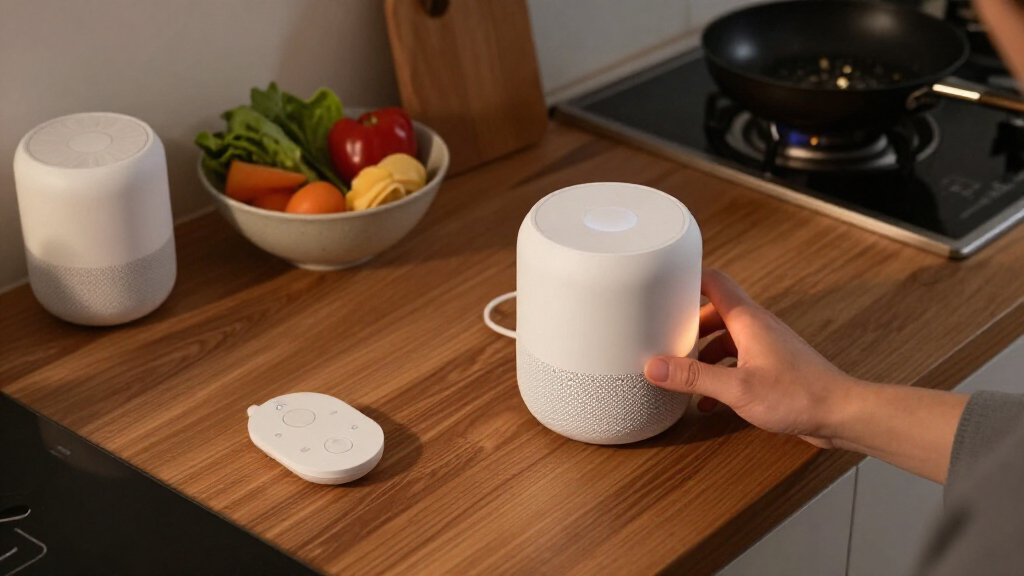

Amazon Echo and Google Nest are two of the most common starting points for a smart home, but the real choice is less about the speaker on the counter than the system you want to build around it. Echo devices use Alexa and work with a broad range of third-party products; Nest devices use Google Assistant and Google Home, which can feel more natural if your household already runs on Google services.

Get the little things that make your day delivered free with Prime
- Fast, free delivery on millions of items
- Prime Video, Amazon Music and more included
- Member-only deals all year
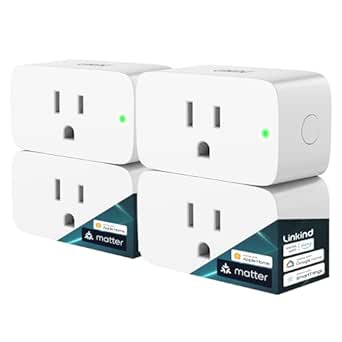
Linkind Matter Smart Plug – Works with Apple Home, Alexa, Siri, Google Home
- ✔ Plug type: Type A
- ✔ Rated amperage: 15 A
- ✔ Power capacity: 1800 W

Echo Show 5 (Charcoal) – Smart Display with Enhanced Bass
- ✔ Display: 5.5-inch touchscreen
- ✔ Dimensions: 5.8 × 3.6 × 3.2 inches
- ✔ Weight: 16.1 oz (456 g)

Kasa Smart Plug HS103P4 – Wi-Fi Outlet, Works with Alexa & Google Home, 4-Pack
- ✔ Pack size: 4 plugs
- ✔ Operating voltage: 120 V AC
- ✔ Rated wattage: 1800 W
For most buyers, compatibility and daily control matter more than a small difference in speaker sound. Echo is the more flexible choice for mixing brands, adding specialized devices, and building routines. Nest makes more sense when you value Google integration, familiar search and calendar services, or already own Nest cameras, thermostats, or speakers. Both systems can control lights, plugs, locks, and other connected devices, but their strengths show up in how you add, group, and control those products.
At a Glance
| Criteria | Amazon Echo | Google Nest | Winner |
|---|---|---|---|
| Device and accessory choice | Broad Echo lineup and wide third-party smart home support | Strong speaker and display range, with especially cohesive Nest products | A |
| Voice assistant | Alexa supports many commands and third-party skills | Google Assistant fits Google searches and services naturally | Depends |
| App and ecosystem integration | Best fit for Amazon services and mixed-brand devices | Best fit for Google Home, Android, and Nest devices | Depends |
| Routines and automation | Flexible routines and broad device-trigger options | Useful household routines, with capabilities depending on devices and region | A |
| Setup and everyday control | Alexa app offers extensive controls, though its breadth can feel busy | Google Home app is a more focused hub for compatible devices | B |
| Privacy and account settings | Controls vary by device and account; settings require review | Google account controls apply; review voice and activity settings | Depends |
| Value and expansion cost | Many entry points and frequent hardware discounts | Good value when building around Nest or Google services | A |
Linkind Matter Smart Plug – Works with Apple Home, Alexa, Siri, Google Home
The Linkind Matter Smart Plug is our most adaptable choice because it is designed to fit into several smart home ecosystems rather than locking control to one app. Apple Home, Alexa, Google Home, and other Matter-compatible platforms are listed as supported, so households with mixed devices can manage a connected lamp or appliance through a preferred assistant. Compared with Kasa, that broader platform story is its clearest advantage.It also supports offline LAN control, which gives it a useful resilience edge: local control can keep working when the internet is unavailable, assuming the home network and compatible controller remain available. Both plug models have a listed capacity of 15 A and 1800 W, so Linkind does not win on load rating alone. Its value comes from combining that rating with Matter, voice control, and schedules in one compact plug.Setup is less universal than the broad compatibility list may suggest. Apple Home, Alexa, and Google Home integration requires a Matter-certified hub or controller, and the plug uses 2.4 GHz Wi-Fi. It is also a Type A plug for U.S. outlets, which limits its fit outside that outlet standard. Choose Linkind when ecosystem flexibility is worth checking your hub and network setup; choose Kasa if you mainly want several simple Wi-Fi outlets without adding a controller.
Pros:
- Matter compatibility spans Apple Home, Alexa, Google Home, and other compatible platforms.
- Offline LAN control can preserve local operation when internet access drops.
- Supports voice commands and scheduling across compatible assistants.
- Rated for 15 A and 1800 W, with a fire-resistant design and FCC/ETL certification listed.
Cons:
- A Matter-certified hub or controller is required for integration with the named ecosystems.
- Uses 2.4 GHz Wi-Fi only.
- Type A plug limits it to compatible U.S.-style outlets.
Best for: Households using multiple smart home platforms that already have, or are willing to add, a Matter-certified controller.
Not ideal for: Buyers who need a plug for non-Type A outlets, lack a compatible Matter controller, or want a multi-pack for several rooms.
Bottom line: We recommend Linkind for a mixed-platform smart home that can meet its controller and outlet requirements.
“We recommend Linkind for a mixed-platform smart home that can meet its controller and outlet requirements.”
Echo Show 5 (Charcoal) – Smart Display with Enhanced Bass
The Echo Show 5 earns a place in this roundup by making smart home control visible. Its 5.5-inch touchscreen can show information and provide a way to interact with Alexa-enabled devices, while the built-in speaker adds a small media and voice-control role. Compared with either plug, it is a much broader bedside or counter device, but it cannot directly switch a lamp or fan unless that appliance is connected through a compatible smart device.Its compact footprint suits a nightstand or kitchen surface where a larger display would be intrusive. The privacy shutter and microphone/camera off button offer physical ways to limit camera and mic access. The camera supports video calls, although its 2 MP resolution is modest for buyers who prioritize detailed video. The speaker is described as tuned for deeper bass and clearer vocals, making voice responses and casual listening part of the appeal.The tradeoff is ecosystem focus. Linkind is the more flexible pick for households that want to span multiple platforms, and Kasa is more direct when the goal is to add several appliance outlets. Echo Show 5 makes sense when we specifically want Alexa with a screen for visual updates, calls, and device controls. It is less suitable for homes built around another assistant, or for anyone expecting a smart display to replace smart plugs.
Pros:
- 5.5-inch touchscreen makes Alexa interactions and smart home controls visible.
- Built-in camera supports video calls and includes a physical privacy shutter.
- Microphone/camera off button provides an additional privacy control.
- Compact design uses recycled polyester yarn fabric and recycled aluminum.
Cons:
- The 2 MP camera may not meet needs for high-detail video calls.
- Its smart home role is centered on Alexa-enabled devices.
- Bluetooth pairing may not work with speakers that require a PIN.
Best for: Alexa households wanting a compact screen for device controls, calls, weather, news, and casual listening.
Not ideal for: Buyers seeking a smart outlet, a high-detail video-call camera, or a control point centered on Apple Home or Google Home.
Bottom line: We would choose Echo Show 5 when a compact Alexa screen matters more than adding an outlet or maximizing platform flexibility.
“We would choose Echo Show 5 when a compact Alexa screen matters more than adding an outlet or maximizing platform flexibility.”
Kasa Smart Plug HS103P4 – Wi-Fi Outlet, Works with Alexa & Google Home, 4-Pack
Kasa HS103P4 is the straightforward pick when the job is to make several existing appliances easier to control. The four-pack can cover lamps, fans, or humidifiers across multiple rooms, and each plug connects directly to 2.4 GHz Wi-Fi. Unlike Linkind, it does not require a hub, which keeps the setup path simple for homes already using Alexa or Google Assistant.Scheduling, timers, countdowns, and remote operation through the Kasa app cover the everyday routines most plug buyers want. The push-button actuator also gives us a manual control point on the plug itself. Like Linkind, the Kasa is rated at 15 A and 1800 W, and its listing identifies UL certification. Those details make it a capable option for compatible loads, though we should still confirm an appliance’s requirements before connecting it.Its main compromise is less ecosystem flexibility. Linkind’s Matter support is more attractive for households that want to combine platforms or preserve a path across compatible controllers, while Kasa’s supplied compatibility details center on Alexa and Google Home. It also relies on 2.4 GHz Wi-Fi and does not offer the local LAN control called out for Linkind. We would pick Kasa for convenient room-by-room coverage, but skip it if Apple Home support or Matter is essential.
Pros:
- Four plugs provide a simple way to cover multiple rooms.
- Connects directly to 2.4 GHz Wi-Fi with no hub required.
- Kasa app supports remote control, schedules, timers, and countdowns.
- Listed as UL certified and rated for 15 A / 1800 W.
Cons:
- The supplied compatibility details list Alexa and Google Assistant, not Matter or Apple Home.
- 2.4 GHz Wi-Fi is required.
- Offline LAN control is not listed.
Best for: Buyers who want to add smart control to several lamps or small appliances and use Alexa or Google Assistant without a separate hub.
Not ideal for: Households that require Matter or Apple Home compatibility, need local LAN operation, or have only 5 GHz Wi-Fi available.
Bottom line: We recommend Kasa when straightforward multi-room coverage matters more than cross-platform support.
“We recommend Kasa when straightforward multi-room coverage matters more than cross-platform support.”
As an Amazon Associate we earn from qualifying purchases.
Key Differences
The biggest practical gap is breadth versus cohesion. Echo is easier to recommend when a home contains products from several manufacturers or the owner expects to keep adding unusual devices. Alexa’s extensive third-party support and routines give it room to adapt as the setup grows. That flexibility can come with a busier app and more choices to manage.
Nest is the more natural center for a household already using Google Home, Android, and Google services. Its app can make common controls feel more direct, and Nest products fit together cleanly. The tradeoff is that buyers should check compatibility before purchasing less common devices, rather than assuming every accessory will be supported equally.
Neither system is universally better for voice control or privacy. Assistant quality depends on the task, language, device generation, and connected services. Privacy also depends on the settings and products in use. Compare the exact devices and features you need, then decide whether Alexa’s flexibility or Google’s tighter ecosystem fit is more valuable.
Detailed Comparison
Device and accessory choice (Amazon Echo wins — major)
Winner: Amazon Echo; major advantage for mixed-brand homes. Alexa is supported across a wide range of smart home products, giving buyers more ways to add a specific sensor, appliance, or control device. Google Home supports many popular brands too, but coverage can vary more for niche products. In practice, check each device’s current compatibility before buying; Echo is the safer default when you expect to mix manufacturers.
Voice assistant (moderate difference)
Winner: Depends; moderate, task-specific difference. Alexa offers a large set of smart home commands and third-party skills. Google Assistant is appealing for people who regularly use Google search, calendars, and other account services. Neither wins every request, and features change across models and regions. Choose according to the tasks your household will actually say aloud, not a general claim that one assistant understands everything better.
App and ecosystem integration (moderate difference)
Winner: Depends; moderate difference. Google Nest fits neatly into Google Home and is an intuitive pick for Android and Google-service users. Echo connects naturally with Alexa and Amazon services and is designed to accommodate varied connected products. The practical winner is usually the system that matches the phones, accounts, and devices already in use, since that reduces switching between apps and accounts.
Routines and automation (Amazon Echo wins — moderate)
Winner: Amazon Echo; moderate advantage in flexibility. Alexa routines can combine voice commands, schedules, and compatible device events, making them useful for custom sequences such as turning off lights and adjusting a thermostat together. Google Home also supports routines, but available triggers and actions depend on the current app, device, and region. If automation is central to the purchase, compare the exact actions you want before committing.
Setup and everyday control (Google Nest wins — minor)
Winner: Google Nest; minor to moderate advantage for simplicity. Google Home presents common controls in a focused app, which can make it comfortable for a household that wants one place to manage familiar devices. Alexa offers more breadth, but its extensive features may take more sorting for some users. This is a small difference for a one-speaker setup and more noticeable as the number of devices grows.
Privacy and account settings (moderate difference)
Winner: Depends; no universal system advantage. Both ecosystems involve account-linked voice services, and both provide privacy controls that users should review. Available controls and defaults vary by product and software version. If microphone controls, saved voice activity, or camera handling are key concerns, inspect the settings for the exact model and service before purchase. A privacy preference should be judged by concrete controls, not brand reputation alone.
Value and expansion cost (Amazon Echo wins — moderate)
Winner: Amazon Echo; minor advantage for budget-conscious expansion. Echo hardware spans multiple price points and is often discounted, so it can be easier to start small or add speakers over time. Nest can offer better value when a buyer specifically wants its devices or already benefits from Google integration. Paying extra for a Nest product makes sense when that fit matters; it rarely pays to replace compatible gear just to standardize brands.
Amazon Echo: Pros and Cons
Pros:
- Broad selection of Alexa-enabled smart home products
- Flexible routines and many third-party integrations
- Multiple hardware price points and frequent discounts
Cons:
- The Alexa app’s breadth can make controls feel busy
- Device support and features vary, so compatibility checks matter
- Amazon ecosystem fit may be less compelling for Google-first households
Google Nest: Pros and Cons
Pros:
- Strong fit with Google Home, Android, and Google services
- A focused app experience for common household controls
- Cohesive choice for homes already using Nest products
Cons:
- Some less common accessories may offer fewer integration options
- The best value depends on wanting Google or Nest features
- Assistant and automation capabilities vary by device and region
Who Should Choose What
Choose Amazon Echo if:
- You expect to combine devices from several brands or add specialized accessories.
- You want extensive routine options and many hardware price points.
- You prefer Alexa or already use Amazon services and devices.
Choose Google Nest if:
- Your household relies on Google Home, Android, or Google services.
- You already own Nest devices and want a familiar control hub.
- You prefer a more focused app for managing everyday connected devices.
Skip both if: Skip both if your required devices do not support either ecosystem, or if you want a setup that works without cloud accounts or voice services; check for local-control alternatives that meet your needs.
Value for Money
Echo is generally the lower-cost way to start and expand, especially when discounted speakers or compatible third-party devices meet your needs. That advantage matters most for buyers adding several rooms or experimenting with smart home controls. Nest can be the better value when its Google integration saves friction every day or when a household already owns Nest equipment. Paying more for Nest makes sense for that ecosystem fit; otherwise, compare device capabilities and total setup cost rather than the speaker price alone. Avoid replacing working accessories solely to make every logo match.
Final Verdict
For a new smart home with mixed brands, choose Amazon Echo: its broad compatibility, flexible routines, and range of prices make it the stronger default for most people who want room to expand. Choose Google Nest if Google Home, Android, and Nest products already shape how your household manages devices. The deciding factor is ecosystem fit: Echo wins on flexibility, while Nest wins on familiarity for Google-first homes. Before buying, confirm that each specific accessory supports the platform and features you intend to use.
Frequently Asked Questions
Can Amazon Echo and Google Nest control the same smart home devices?
Many popular connected devices support both Alexa and Google Home, but support is not universal and features can differ between platforms. Check the product’s current compatibility listing and confirm that the specific controls you need are available.
Which is easier for a beginner to set up?
Google Home can feel more focused for basic device control, while Alexa offers more settings and integrations to explore. Either can be approachable for a small setup. Start with one speaker and a compatible light or plug, then add products gradually.
Is Google Nest better if I use an Android phone?
It is a natural fit, particularly if you already use Google services, but Android alone does not require Nest. Echo devices also work with Android phones. Choose based on your household’s services and the devices you want to connect.
Is Alexa or Google Assistant better for privacy?
There is no universal winner across every device and setting. Review microphone controls, voice activity options, and account settings for the exact products you plan to use. Camera and household data controls can also differ by device.
Should I pay more for a Nest device?
Pay more when Google integration, Nest compatibility, or a specific feature improves your daily use. If a lower-cost Echo or third-party device provides the same controls you need, the premium may not add much value.